 1300 781 148
 Contact us
 Service status
 Support
 Partner login

 Cloud Infrastructure
 Voice


What is Hosted Network SD-WAN?
We bond a site’s internet connections into one always‑on link with their combined speed and a static IP that never changes, managed from a single portal.
Built by Hosted Network, end to end: the box at the site, the network it runs on and the portal you manage it from. The link terminates in our network, so we control both ends.
Over a decade of delivering connectivity for businesses that rely on uptime, now built into one portal you control.
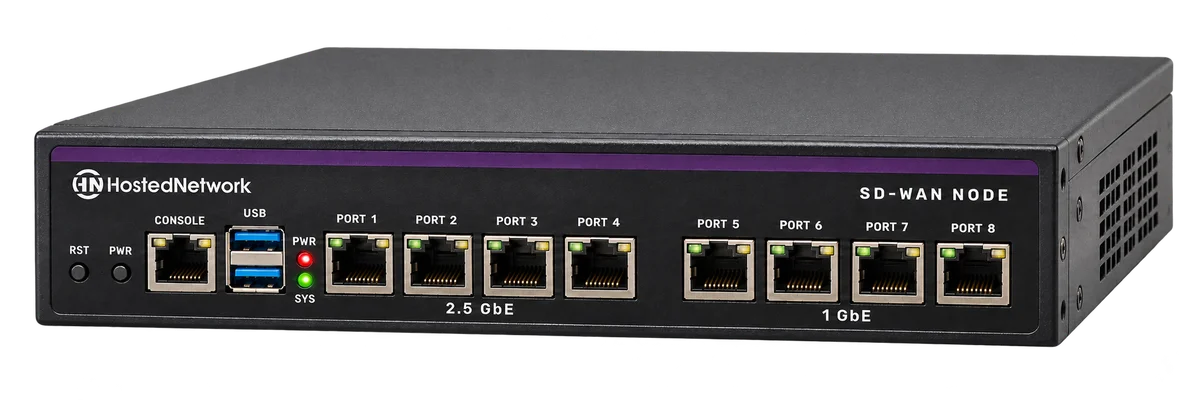
nbn, fibre, 4G, 5G, Starlink and satellite. Any carrier. Bonded into one always‑on link.
Three 500 Mbps links deliver about 1,250 Mbps combined. Add a link and the site gets faster.
The IP lives in a Hosted Network data centre, not on the link. It survives link failover, reboots and hardware swaps.
A link fails and the site keeps working. The call never drops on failover.
The box is included in the monthly service and covered by warranty for the life of the service.
How Hosted Network SD-WAN works
Every link at the site feeds one box. The box bonds them into one link that terminates in our network, where the static IP lives.
Mix and match up to 7 connections per site: nbn, fibre, 4G, 5G, Starlink or satellite, from any carrier. The static IP never changes, even when a link fails.
The IP stays the same when a link fails
Failover on its own isn’t enough. If the address changes, everything pointed at that address breaks.
A link failing shouldn’t mean a support call. With Hosted Network SD-WAN the static IP lives in our network, so it doesn’t move when the link does. That includes 4G, 5G and Starlink links, which can’t get a static IP on their own today.

Fewer tickets, fewer call-outs, and no explaining to your customer why the site “was up”.

Keep the firewall you already run
Changing firewalls costs time and money, and retraining a team costs more. So we don’t ask you to.

Bridge Mode
The box sits in front of your firewall and hands it an Ethernet connection carrying the static IP. Your firewall, your rules, your team’s existing skills. Nothing to reconfigure.

Router Mode
For small sites with no firewall of their own. The box is the site’s router, and the site still gets the bonded link and the static IP.

Local internet failover
Optional, and set per site when you provision it. Choose it at setup if the site needs it. You can change this on a per-link basis and at any time from the portal.
Not all SD-WAN is created equal
We’re a telco. We run the device at the site and the network it connects to, so we can combine your links and give the site a static IP that never changes.
Run every site yourself, from one portal
Central management is table stakes. The difference is what you can do without raising a ticket.
Every site, every link, one multi-tenant portal with access scoped the way you want it. See latency, loss, jitter and throughput for the bond and every link, so you can pinpoint a fault without raising a ticket.
See the portal in the demo
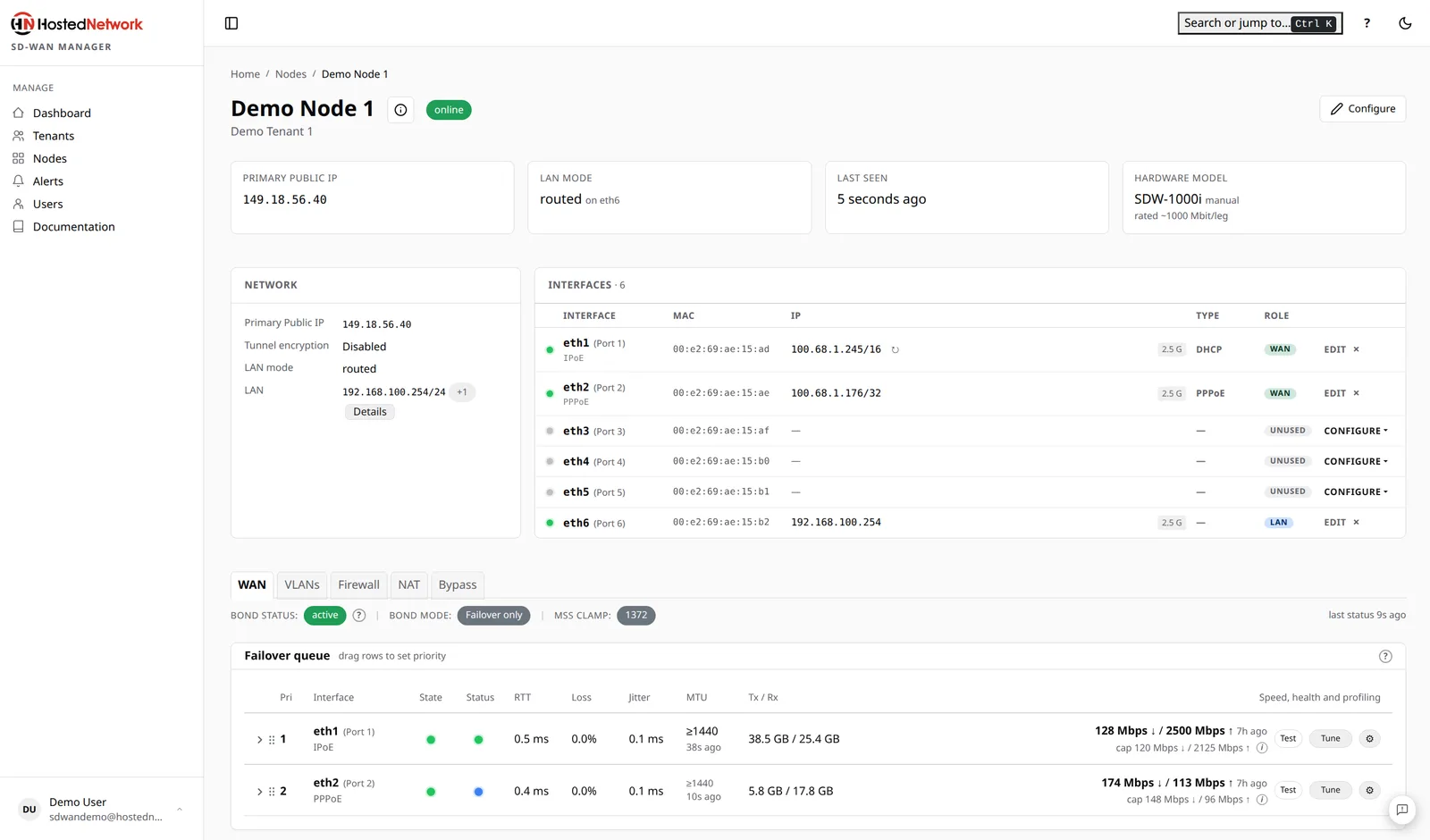
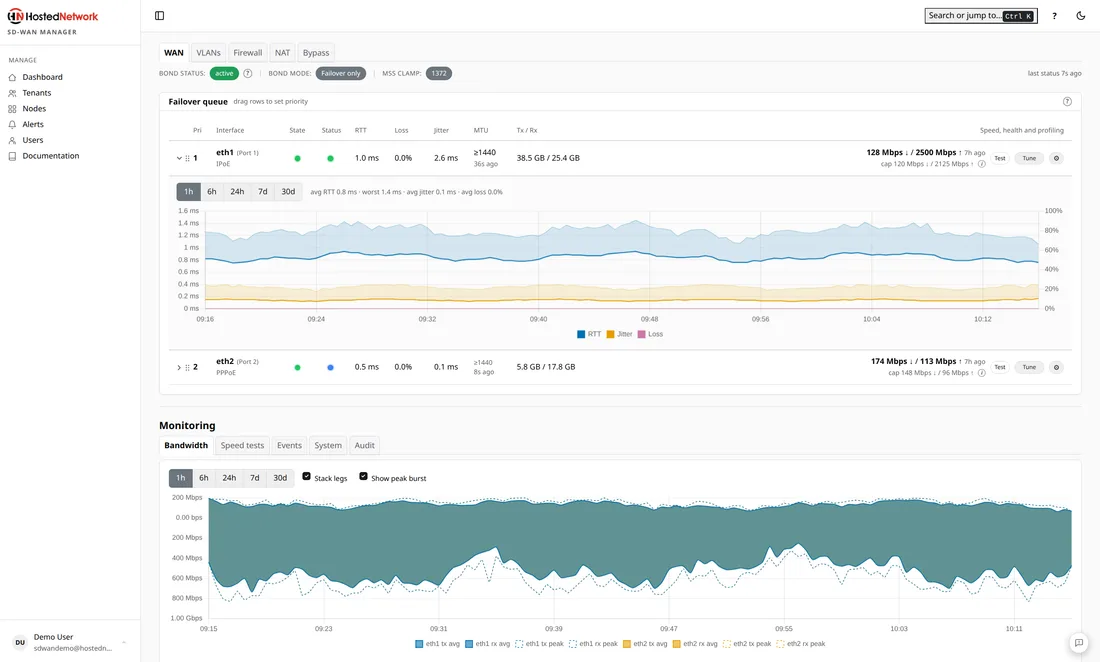
Set the site up in the portal, plug the links in, and it comes online.
Give your team, or your customer, exactly the access they need and nothing more.
Latency, loss, jitter and throughput for the bond and every link, live and over time.
Every capability is included. Nothing to unlock later.
Where SD-WAN fits
Any customer whose business stops when the internet does. Four places to start.

Retail and POS
EFTPOS and cloud POS that can’t go down. When a link fails, payments keep going through and the shop keeps trading.

Critical applications
Clinics, dispatch, logistics, cloud voice. The apps the business runs on stay connected, and the call never drops on failover.

Regional and Starlink
Starlink and 4G with a static IP, so the things that need one keep working. Bond them with an nbn or fibre link and the site stays online when one drops.

Multi-site and MPLS replacement
Link your sites over a private mesh through our network, with the bonded WAN at every site. Swap the MPLS bill for something better.

“Working with Hosted Network is like having an extension of your team. Or your family. We needed an SD-WAN solution rolled out across 3 states and more than 20 sites, and we got it.”
SD-WAN questions MSPs ask
01What links can it bond?
Any internet connection, from any carrier: nbn, fibre, 4G, 5G, Starlink and satellite. Mix and match up to 7 per site.
02What does “always-on” actually mean?
Your customer stays online when a link fails. Failover is sub-second, calls and sessions carry on, and the IP stays the same.
03How much bandwidth does the site get?
Bonding adds your links together. The site gets about 80 to 85% of each link’s bandwidth, so three 500 Mbps links deliver about 1,250 Mbps. That’s deliberate: we tune every link and cap it at a level that suits it, so no link saturates and picks up latency, and performance stays consistent. Add a link and the bond grows.
04Is the traffic encrypted?
Yes. Encryption is an optional setting per bond, and you can enable it from the portal.
05Does the box do wifi?
No. The box handles the WAN side. Wifi stays with your access points or your firewall, as it does today.
06Can I get a static IP on Starlink, 4G or 5G?
Yes. The static IP lives in our network, not on the link, so it works on any link we bond, including 4G, 5G and Starlink. It doesn’t change when a link fails.
07Who owns the hardware?
Hosted Network. The box is included in the monthly service, covered by warranty for the life of the service, and returned when the service ends.
See how it would work for your customers
A live online walkthrough of the platform and the portal. Ask us anything, and we’ll show you how it would work for the sites you look after.
 A live walkthrough of the platform and the portal
- Time for your questions
- If it’s a fit, a 3-month proof of concept for eligible MSPs, hardware included
Open to Hosted Network partners. Not a partner yet? Apply here.